
Help confirm that opted-in students board and exit at expected stops with a camera-assisted workflow designed around district transportation procedures.
EyesOnIt is developing a district-scoped school bus ridership verification pilot that combines bus-mounted cameras, student and route context, and a simple driver review workflow. The goal is to give transportation teams clearer information at each stop while keeping final decisions with trained staff and district procedures.
Help ensure opted-in students get on and off at the right stops. EyesOnIt’s student ride verification pilot compares camera-observed activity with approved student assignments and stop information.
Bring expected riders, observed exits, and daily exceptions into a concise stop checklist. Configured status indicators help drivers identify what needs review while following district procedures.
Include boarding and exit notifications for approved parents and caregivers in your pilot. Your district defines recipients and message content, with delivery timing dependent on connectivity and configuration.
Include offline verification in your pilot so the boarding and exit workflow can continue when cellular service drops. Synchronization and notification behavior are configured for your operating environment.
Shape the pilot around your routes, cameras, existing systems, and student-data requirements. Opt-in enrollment, access controls, and retention policies are defined with your district.
Transportation teams routinely reconcile route assignments, daily exceptions, driver observations, and family questions. A focused verification workflow can help staff compare what was expected at a stop with what the approved system observed, then direct attention to the rides that need review. Here’s how EyesOnIt is contributing to a safer, smarter school bus experience.
Compare expected and observed activity for opted-in students so a driver or authorized transportation team member can review a potential wrong-bus, missed-stop, or unexpected-exit event under district procedure.
Present a concise stop checklist and configured status indicators instead of asking the driver to monitor another continuous data feed. When review is needed, the district defines the confirmation and escalation steps.
Give authorized transportation staff a reviewed record of relevant boarding and exit activity to support follow-up with drivers, schools, and families.
Define enrollment, access, retention, notifications, connectivity behavior, and integrations for the pilot with district transportation, IT, privacy, security, and legal stakeholders.
Traditional school bus monitoring relies on manual headcounts, paper rosters, and radio calls. In busy, high-pressure environments, mistakes happen:
➡️ A student exits at the wrong stop.
➡️ A child misses their assigned stop.
➡️ A parent doesn’t know if their child boarded.
➡️ Dispatch teams spend time investigating avoidable issues.
Modern school bus safety systems must provide real-time verification and clear communication, without disrupting daily operations.
EyesOnIt works with the tools districts already use, including:
➡️ Student rosters and photos
➡️ Bus assignments and stop data
➡️ Daily route exceptions
➡️ Secure parent communication systems
➡️ Supports offline operation, so verification continues even if cellular connectivity drops
1️⃣ Define the expected ride: Use approved student roster, bus assignment, stop, and daily-exception inputs for the selected pilot routes.
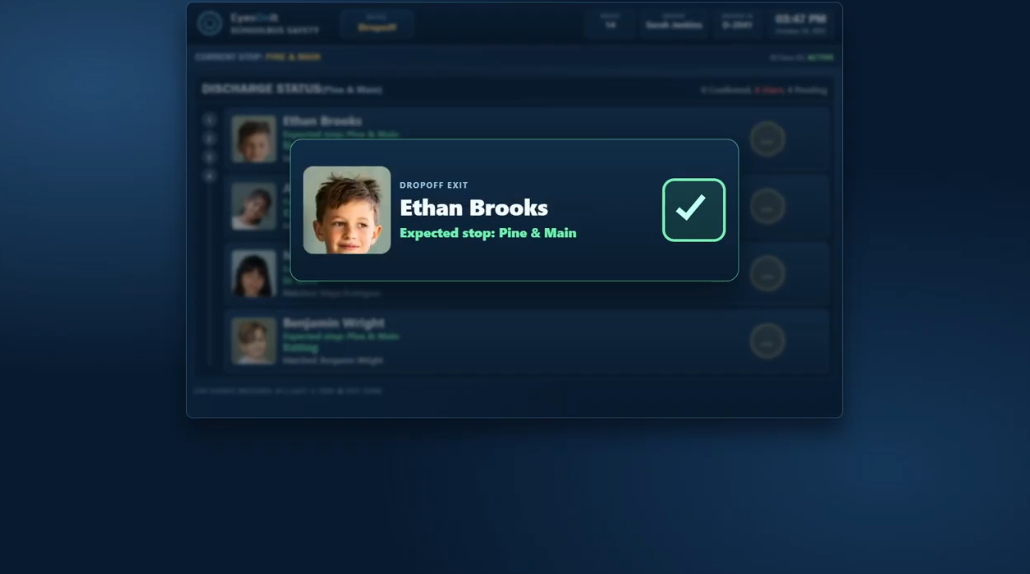
2️⃣ Observe boarding and exiting. Bus-mounted cameras support identification of opted-in students at configured boarding and exit points.
3️⃣ Compare expected and observed activity. The workflow evaluates the approved route context and surfaces mismatches for review.
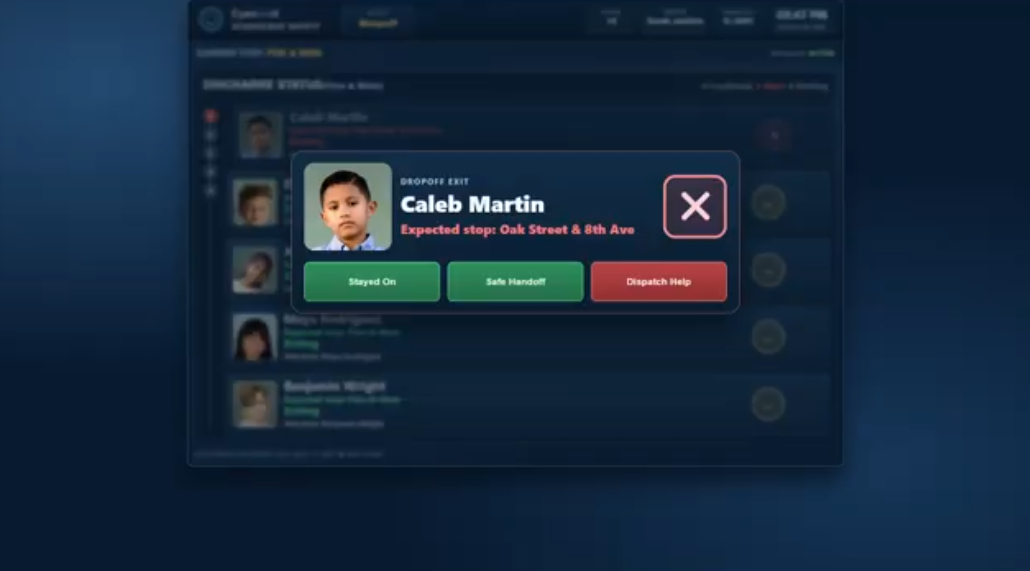
4️⃣ Prompt the right person. A driver-facing checklist or authorized operations view presents the status and next step.
5️⃣ Record the reviewed outcome. Authorized staff can use the resulting event history to support transportation follow-up and approved notifications.
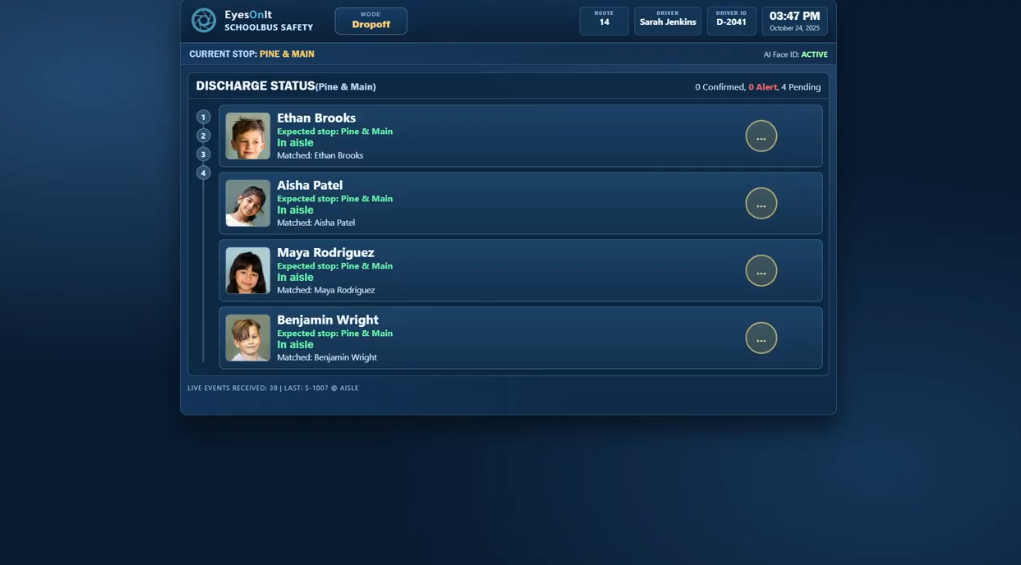
For example, a Stop Checklist screen shows the driver a clear summary at every stop:
➡️ Expected students to exit.
➡️ Observed students who exited.
➡️ Any daily exceptions.
Simple status indicators make for a user-friendly experience:
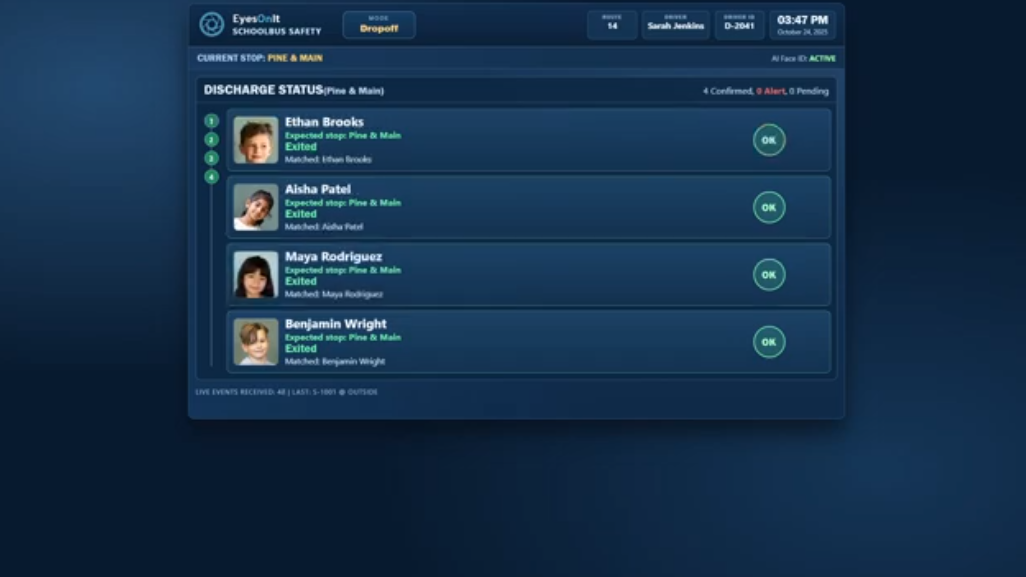
➡️ Green: All students accounted for
➡️ Yellow: Review needed
➡️ Red: Do not depart
If everything is correct, the stop clears automatically. If not, the driver has simple one-tap options to confirm or adjust. This makes EyesOnIt a practical school bus monitoring system, not just another technology layer.
Protecting student data is essential. EyesOnIt is built with:
➡️ Opt-in enrollment
➡️ District-controlled servers
➡️ Encrypted data at rest and in transit
➡️ Role-based access controls
➡️ Automatic expiration of temporary ride data
➡️ District-defined retention policies
For the duration of a ride, EyesOnIt may create a temporary ride signature to improve verification even if a student’s face is briefly not visible. This temporary data automatically expires at the end of the route.
The system is built specifically for transportation safety, not general surveillance. All student data remains under district control, supporting responsible deployment of school bus safety technology.
Want to learn more about how EyesOnIt can improve student transportation safety in your district?
If your area is exploring ways to modernize student transportation safety and implement reliable school bus safety technology, we’d love to show you how EyesOnIt works.
Schedule a live demo and experience the EyesOnIt school bus safetu workflow firsthand.
Let’s make every stop safer, together.
| Feature | Description |
|---|---|
|
Multi-Layer Verified Detection |
Validates motion events with natural-language descriptions, face recognition, and image similarity, so alerts are accurate and actionable. Fewer false alarms, fewer missed incidents, and less operator fatigue. |
|
Natural-Language Object & Behavior Detection |
Describe what matters in plain English (e.g., “loitering near door” or “vehicle enters between 6pm and 6am”) and refine anytime without retraining models. Get custom detections without custom model costs. |
|
Face Recognition with Watchlists |
Import galleries, organize watchlists, and receive instant alerts when matches are detected. Strengthen security response and enable verified access workflows without increased staffing overhead. |
|
AI Video Search (Live & Archived) |
Instantly search live and recorded video feeds using text descriptions, face recognition or image uploads. Find people, objects, and events in seconds, turning hours of manual review into minutes. |
|
Automated Event Workflows |
Trigger lights, alarms, intercoms, notifications, or downstream systems when a verified visual event occurs. Improve response speed, consistency, and operational efficiency. |
|
Reporting & Analytics |
Generate searchable timelines, export event clips, and track detection trends across cameras and locations. Gain measurable insight while simplifying investigations and internal reporting. |
|
On-Site Processing |
Keep video and identity data on your network, eliminating cloud latency and per-event processing fees while maintaining real-time performance and stronger data control. |
|
Open, Hardware-Agnostic Architecture |
Works with existing cameras, RTSP streams, and your current VMS. Runs on standard servers with no proprietary lock-in, so you can scale affordably without rip-and-replace upgrades. |
Absolutely. Student ride verification is a pilot capability. EyesOnIt scopes the workflow with each district or transportation organization based on its operating procedures, existing systems, infrastructure, and privacy and security requirements.
Potential pilot scope uses bus-mounted cameras and opted-in student enrollment, combined with approved roster, assignment, stop, and exception information. Identification performance depends on camera placement, visibility, lighting, enrollment quality, and the final pilot configuration.
No. The workflow presents configured status and review information to support trained staff. The district defines the confirmation, escalation, departure, and post-route procedures, and the pilot does not replace required human checks.
Offline operation is available within the approved pilot scope so verification can continue when cellular connectivity drops. Synchronization, delayed notifications, and other network-dependent behavior must be defined and tested for the deployment.
Parent or caregiver notifications can be included in a pilot when the district approves the recipients, message content, consent model, and delivery workflow. Notification timing can depend on connectivity and the configured provider.
Pilot design can include opted-in enrollment, district-defined roles, access controls, retention rules, temporary ride-data expiration, district-controlled infrastructure, and reviewed encryption requirements. The district and its reviewers determine the applicable legal, policy, consent, record-access, and contract requirements.
It can! The pilot focuses on boarding and exit verification, not route planning or bus-location tracking. During discovery, EyesOnIt reviews how approved roster, route, stop, exception, and notification information could fit the district’s current environment.
Bring a bounded transportation objective, approximate fleet and pilot-route size, current roster and routing systems, available camera context, connectivity expectations, and the district teams responsible for transportation, IT, privacy, security, and student-data review. Do not send student names, images, credentials, camera URLs, or private route data through the website form.
Share your specific use case for details on how our AI video analytics technology can help. Fill out the form below and a member of our team will be in touch.
© 2026 All Rights Reserved.